A modern cloud phone system can do far more than simply make and receive calls. Yet many businesses invest in cloud telephony without taking advantage of all the cloud phone system features available to them.
From intelligent call routing and mobile apps to call recording, reporting and business continuity, the right cloud phone system can help your team communicate more effectively while giving customers a better experience.
For businesses with hybrid teams, multiple locations or employees regularly working away from the office, these cloud phone system features can be particularly valuable.
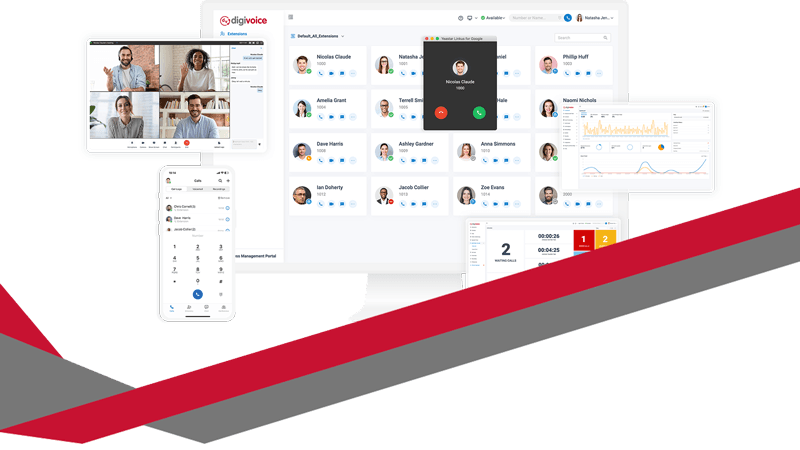
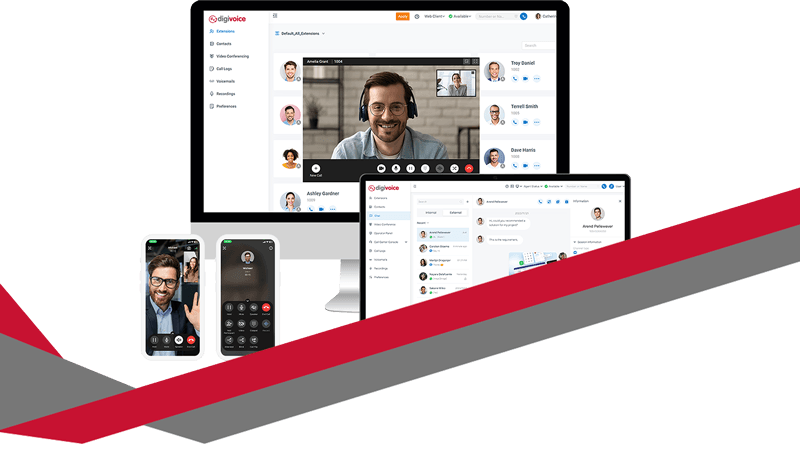
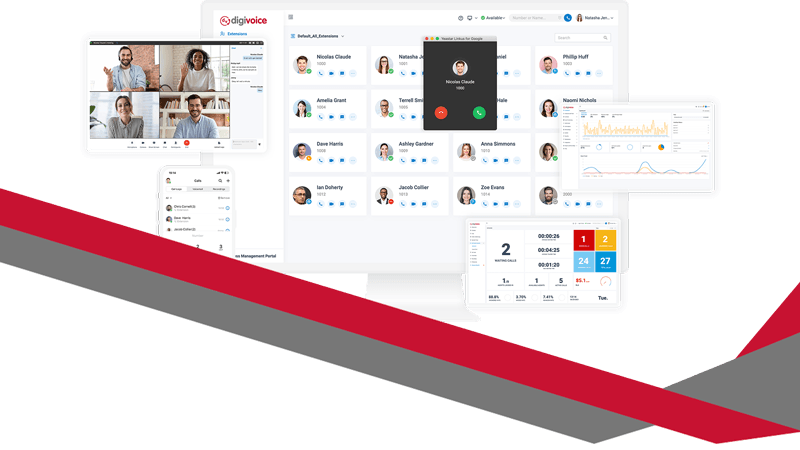
At Digicomm 360, Digivoice gives businesses a flexible cloud-based telephone system designed around the way modern organisations actually work.
So, are you getting everything you could from your business phone system?
Here are seven cloud phone system features that could transform the way your business communicates.
1. Cloud Phone System Features for Intelligent Call Routing
What happens when someone calls your business?
With a traditional telephone setup, the answer might simply be that one particular telephone rings. If nobody answers it, the customer could be left waiting or eventually reach voicemail.
A cloud phone system provides much greater control over how incoming calls are handled.
Call routing allows calls to be directed according to rules set by your business. A call might ring several employees simultaneously, move from one person to another or be directed to a particular team.
Hunt groups can be especially useful for departments such as:
Sales
Customer service
Accounts
Technical support
Reception
Instead of relying on one employee being available, calls can be distributed between appropriate members of the team.
This can help reduce missed calls and waiting times while making it easier for customers to reach someone who can actually help them.
If you’re still using a traditional telephone setup, our guide to the benefits of cloud telephony for business explains why more organisations are moving their communications to the cloud.
2. Mobile and Desktop Cloud Phone System Features
Business no longer happens exclusively at a desk.
Employees may work from home, visit customers, travel between locations or simply spend part of their day away from their office telephone.
A cloud phone system can allow users to access their business telephone service through applications on compatible devices, such as computers and smartphones.
That means your business number doesn’t necessarily have to be tied to one physical telephone sitting on one particular desk.
Employees can remain connected while working from different locations and continue to present a professional business identity when communicating with customers.
This can be particularly valuable for hybrid and remote working teams.
It can also help avoid situations where employees feel they need to give customers their personal mobile numbers simply because they’re working away from the office.
The result is greater flexibility for your employees without losing control of your business communications.
3. Call Recording for Training and Customer Service
Call recording is another powerful cloud phone system feature that many businesses can benefit from.
Depending on your organisation and how recording is configured and managed, recorded calls can support areas such as employee training, customer service and quality assurance.
For example, managers may be able to review conversations to understand how enquiries are being handled.
Recordings could help identify:
Training opportunities
Common customer questions
Successful sales techniques
Areas where processes could improve
Customer service issues
Misunderstandings about previous conversations
Call recording can also provide useful context when a customer queries what was discussed during a previous telephone conversation.
However, businesses should consider their legal and data protection responsibilities when recording calls, including why calls are being recorded, how recordings are stored and who has access to them.
4. Voicemail to Email Helps You Manage Missed Calls
Voicemail is useful, but traditional voicemail systems aren’t always particularly convenient.
Someone may need to remember to dial into a mailbox, enter a PIN and listen through several messages before finding the one they need.
Cloud telephony can make voicemail much easier to manage.
With voicemail-to-email functionality, voicemail notifications or recordings can be delivered to an email inbox, depending on the configuration of the system.
That means employees can manage messages alongside their other communications rather than repeatedly checking a separate voicemail service.
It can be particularly helpful when staff are:
Working remotely
Away from their desk
Travelling
Moving between customer sites
Managing multiple responsibilities
The important thing is that a missed telephone call doesn’t have to become a missed business opportunity.
5. Cloud Phone System Reporting and Analytics
Do you know how many calls your business receives?
What about your busiest times of day?
How many calls go unanswered?
How long are customers typically waiting?
Without reporting, it can be difficult to know whether your telephone system is genuinely supporting your business effectively.
One of the most useful cloud phone system features is access to information about call activity.
Call reporting can help businesses better understand how customers are contacting them and how their teams are responding.
For example, you may discover that a significant number of calls arrive first thing on Monday morning, but you don’t have enough people available to answer them.
Perhaps calls regularly go unanswered during lunch.
Or you might discover that one department receives significantly more calls than expected.
Information like this can help managers make better decisions about staffing, call routing and customer service.
Instead of guessing what’s happening on your telephone system, reporting can give you information you can actually use.
6. Auto Attendants Can Direct Customers to the Right Team
You’ve probably encountered an auto attendant yourself.
It’s the system that greets callers and provides options such as:
“Press 1 for sales, press 2 for accounts or press 3 for support.”
For the right organisation, an auto attendant can make call handling much more efficient.
Instead of every call reaching reception before being manually transferred, callers can select the department they need.
That can reduce unnecessary transfers while helping customers reach the appropriate team more quickly.
It can also help businesses create a more professional and consistent experience.
Combined with professionally recorded greetings and music on hold for business, your telephone system becomes part of the overall customer experience rather than simply a way of answering calls.
The key is keeping the journey straightforward.
Customers generally want to reach the right person quickly, so menus should be clear and designed around genuine customer needs rather than creating endless layers of options.
7. Business Continuity and Call Diversion Features
What happens to your telephone system if nobody can get into the office?
It could be bad weather, a power problem, an internet issue at one location or simply an unexpected situation that means employees need to work elsewhere.
With traditional telephone infrastructure, disruption at your premises could potentially mean disruption to your calls.
Cloud telephony provides businesses with much greater flexibility.
Calls can potentially be redirected to alternative users, locations or mobile devices according to your configuration.
That means your telephone system can become part of your wider business continuity planning.
It is also valuable during more routine situations.
If someone is on holiday, working remotely or away from their desk, calls can be managed differently rather than simply ringing an unanswered extension.
For customers, the important thing is that your business remains contactable.
For employees, it means communication isn’t necessarily dependent on being physically present next to a particular telephone.
Which Cloud Phone System Features Does Your Business Need?
Moving from traditional telephony to a cloud phone system is only the beginning.
The real value comes from choosing and configuring the cloud phone system features that suit the way your business operates.
Think about your current telephone setup.
Are customers regularly struggling to reach the right person?
Are employees giving out personal mobile numbers when working remotely?
Do you know how many calls your business misses?
Can employees easily access voicemail when they’re away from the office?
Could your telephone system continue operating effectively if your team suddenly had to work elsewhere?
If the answer to some of those questions is no, you may not be getting everything you could from your business communications.
Our guide to cloud telephony for UK businesses provides more information about how moving telephone services to the cloud can support a modern organisation.
Why Choose Digivoice From Digicomm 360?
Every business communicates differently.
A small professional services company may need a straightforward system that allows a handful of employees to work flexibly. A larger organisation may require multiple departments, sophisticated call routing, reporting and support across several locations.
That’s why choosing a business telephone system shouldn’t simply be about buying a collection of handsets.
It should start with understanding how your organisation communicates.
With Digivoice from Digicomm 360, we can help you create a cloud telephone solution around your business, your employees and your customers.
We can help you identify which cloud phone system features will genuinely benefit your organisation rather than providing technology you never use.
And as your organisation changes, cloud communications provide the flexibility to adapt with it.
Ready to Get More From Your Business Phone System?
Your telephone system should do more than ring.
With features including intelligent call routing, mobile working, call recording, voicemail to email, reporting, auto attendants and flexible call diversion, a modern cloud phone system can become an important part of how your business operates.
Whether you’re still using traditional telephone lines or already have cloud telephony but aren’t making full use of its features, Digicomm 360 can help.
Talk to the Digicomm 360 team about Digivoice and discover which cloud phone system features could transform your business communications.
Further Reading
Want to learn more about improving your business communications?
Business call recording benefits go far beyond simply saving telephone conversations. Modern call recording systems help businesses improve customer service, train staff, resolve complaints and gain valuable business insights. If you’re wondering whether business call recording is worth the investment, here are seven benefits every business should know.
Yet many organisations rely on handwritten notes or memory when reviewing customer conversations. Important details can be forgotten, misunderstandings can occur, and valuable opportunities for improvement are often missed.
That’s where business call recording can make a real difference.
Modern call recording systems do far more than simply save conversations. They provide valuable insights into customer behaviour, support staff development and help businesses make informed decisions based on real interactions.
Here are seven ways business call recording can improve your customer service:
1. Business Call Recording Benefits for Customer Service
Every customer expects the same high standard of service, regardless of who answers the phone.
Call recordings allow managers to review conversations and ensure employees are following company procedures, delivering accurate information and maintaining a professional approach.
By identifying examples of excellent customer service, businesses can create consistent standards across every member of the team.
2. Business Call Recording Benefits for Staff Training
One of the biggest advantages of business call recording is the ability to use real customer conversations during training.
Instead of relying solely on role play or written guidance, employees can listen to successful calls, learn from experienced colleagues and understand how difficult situations are handled professionally.
Constructive feedback becomes much easier when managers can discuss actual customer interactions rather than relying on memory.
3. Business Call Recording Benefits for Complaint Resolution
Disagreements can happen in any business.
When conversations are recorded, there’s no need to guess what was said. Managers can simply review the recording to understand exactly what happened.
This often allows complaints to be resolved more quickly while protecting both the customer and the business.
Call recordings provide an accurate record that can reduce misunderstandings and support fair decision-making.
4. Identify Opportunities to Improve Your Business
Every customer conversation contains valuable information.
By reviewing recordings and analysing call reports, businesses can identify recurring questions, common problems and opportunities to improve products, services or internal processes.
You may discover:
Frequently asked questions that could be added to your website
Products customers regularly request
Areas where staff require additional training
Times when additional employees are needed to answer calls
Small improvements based on customer feedback can have a significant impact over time.
5. Business Call Recording Benefits for Performance Management
Without accurate information, it can be difficult to understand how your team is performing.
Business call recording, combined with call reporting, allows managers to monitor key performance indicators such as:
Call handling quality
Customer service standards
Average call duration
First-call resolution
Sales conversations
Missed opportunities
Rather than using recordings to criticise staff, many businesses use them to recognise excellent performance and encourage continuous improvement.
6. Support GDPR Compliance and Business Protection
Many organisations operate in industries where maintaining accurate communication records is essential.
Business call recording can help support compliance requirements, quality assurance processes and dispute resolution when implemented in line with UK GDPR and relevant legislation. The Information Commissioner’s Office (ICO) provides official guidance on call recording, data protection and the lawful processing of personal data, helping businesses understand their responsibilities.
Secure storage, controlled user permissions and configurable retention periods help businesses manage recordings responsibly while maintaining appropriate security.
7. Gain Valuable Business Insights
Modern call recording systems are much more than digital voice recorders.
When combined with call management and real-time reporting, they provide detailed insights into how your business communicates.
Managers can review:
Peak call times
Missed calls
Customer demand
Team availability
Call trends
Service performance
This information helps businesses make informed decisions about staffing, customer service and operational efficiency.
Business Call Recording Benefits Beyond Compliance
Many businesses initially invest in call recording because of compliance or legal requirements.
However, they quickly discover that the biggest benefit is often the valuable insight it provides into customer service, employee development and business performance.
By understanding every customer interaction, organisations can continuously improve the way they communicate and deliver a better overall experience.
How Digicomm 360 Can Help
At Digicomm 360, we provide secure Business Call Recording & Call Management solutions designed for modern UK businesses.
Our solutions include:
Secure cloud call recording
Real-time reporting
Intelligent call routing
Call analytics
CRM integration
Performance monitoring
Secure cloud storage
Flexible recording controls
Whether you’re looking to improve customer service, support staff training or gain greater visibility over your business communications, we’ll help you find the right solution.
Looking to improve your business communications even further? Explore our related telecoms solutions designed to help UK businesses communicate more effectively, improve customer service and increase productivity.
digivoice Cloud Telephone System
Discover how our DigiVoice cloud telephone system gives your business greater flexibility, advanced call handling features and seamless communication wherever your team works.
Professional on hold messaging isn’t just background noise – it’s a powerful marketing tool that can transform silent waiting time into meaningful customer engagement.
At Digicomm 360, we help businesses turn every second on hold into a branded, professional experience that keeps callers informed, reassured, and ready to buy.
If your customers are currently sitting in silence… or worse, listening to generic beeps… you could be missing out on valuable opportunities. As a result, callers gain confidence in your business before they even speak to a member of your team.
What is Music on Hold?
Music on Hold (MoH) is the audio your callers hear when they’re placed on hold during a phone call.
Instead of silence or repetitive tones, businesses can use:
Branded messages
Professional voiceovers
Background music
Promotions and announcements
It’s a simple addition to your phone system – but one that can make a huge difference to customer experience.
Why Music on Hold Matters for Your Business
First Impressions Count
When a customer calls your business, their experience starts immediately – even if they’re placed on hold.
Professional caller messaging helps you:
Sound more professional
Reinforce your brand
Build trust from the first interaction. As a result, callers gain confidence in your business before they even speak to a member of your team.
Reduce Call Drop-Off Rates
Silence makes people think they’ve been disconnected.
With professionally managed hold audio:
Callers know they’re still connected
They’re more likely to stay on the line
You reduce missed opportunities. Consequently, businesses often experience fewer abandoned calls and improved customer engagement.
Promote Your Services While They Wait
Think of on hold messaging as free advertising to a captive audience.
You can promote:
New services
Special offers
Business updates
Opening hours
Instead of wasting hold time, you’re actively selling and informing. In addition, you can highlight seasonal promotions, new products and key business updates.
What Makes Great On Hold Messaging?
Not all Music on Hold is created equal. The best systems are:
Professionally Recorded
Clear, high-quality voiceovers make your business sound polished and trustworthy.
Branded and Consistent
Your messaging should reflect your tone, values, and brand identity.
Regularly Updated
Outdated messages can confuse customers. Keep your content fresh and relevant.
Well-Timed
Messages should be spaced naturally – not repetitive or overwhelming.
Common Mistakes to Avoid
Many businesses unintentionally create a poor experience with their telephone hold messages.
Avoid:
Silence or dead air
Low-quality recordings
Overly long or repetitive messages
Outdated promotions
Generic, unbranded audio
Your phone system should enhance your reputation – not damage it.
This gives your business full control over how you sound to customers. Meanwhile, updates can be made quickly without requiring changes to your wider phone infrastructure.
Why Choose Digicomm 360 for On Hold Messaging?
At Digicomm 360, we don’t just provide Music on Hold – we create strategic audio experiences that support your business goals.
We help you turn “You’re on hold…” into “You’re still engaged.”
Make Every Call Count
Every inbound call is an opportunity. Therefore, businesses should make the most of every customer interaction, including the time callers spend on hold.
The UK’s telecoms landscape is changing, and if your business still relies on traditional phone lines, this affects you. The Big Switch Off, now confirmed for 2027, marks the end of analogue landlines across the UK. While that might sound like something you can deal with later… the reality is very different.
Businesses that leave it too late risk disruption, downtime, and unnecessary stress. Consequently, organisations should start reviewing their telecoms infrastructure sooner rather than later.
The Big Switch Off is the UK-wide shutdown of the traditional Public Switched Telephone Network (PSTN) and ISDN lines.
These are the old copper-based phone systems that have powered UK communications for decades.
They’re being permanently switched off and replaced with fully digital networks, mainly using VoIP (Voice over Internet Protocol) – meaning calls are made over the internet instead of phone lines.
The UK is modernising its infrastructure, and telecoms is a huge part of that. As a result, every business must prepare for the Big Switch Off 2027 and the move to digital communications. Therefore, businesses must ensure their communications systems are ready for the future.
What Will Stop Working After the Big Switch Off 2027?
This is where it gets important.
The Big Switch Off isn’t just about your desk phones – it impacts any system using analogue lines.
1. Traditional Phone Systems
If you’re using:
ISDN lines
PSTN-based systems
On-site PBX hardware
These will stop working completely.
2. Alarm & Security Systems
Many systems rely on analogue connections, including:
Intruder alarms
Fire alarms
Lift emergency lines
If not upgraded, these could fail – which is a serious risk.
3. Payment Terminals
Some card machines still use phone lines.
Without upgrading, you could find yourself unable to take payments.
4. Fax Machines & Legacy Equipment
Yes… They still exist in some industries.
And yes… they’ll stop working too.
The Risks of Delaying the Big Switch Off 2027 Transition
A lot of businesses are thinking:
“We’ve got until 2027 – we’ll deal with it later.”
That approach could cause problems. However, many organisations underestimate how long a successful migration can take.
Here’s why:
Engineers and providers will become fully booked
Hardware shortages may occur
Rushed decisions often lead to poor systems
You risk downtime during a critical transition
Put simply, leaving it late will cost more, take longer, and create more stress. Therefore, businesses should start planning for the Big Switch Off 2027 now rather than waiting until the final stages of the transition.
What Should You Be Doing Right Now?
Preparation doesn’t need to be complicated – but it does need to start early.
Step 1: Audit Your Current Setup
Identify anything using a phone line:
Phone systems
Alarms
Payment machines
Broadband connections
Step 2: Review Your Internet Connection
Digital calls rely on your internet. For this reason, connectivity should be reviewed before moving to a cloud-based phone system.
You may need:
Faster broadband
A leased line for reliability
Network upgrades
Step 3: Choose a Future-Proof Solution
This is the most important step.
Not all VoIP systems are equal; you need something:
Reliable
Scalable
Easy to use
Fully supported
Why Businesses Are Switching to Cloud Telephony Now
Forward-thinking businesses aren’t waiting for 2027.
They’re switching early and seeing immediate benefits. Furthermore, businesses that prepare early for the Big Switch Off 2027 can spread costs, avoid disruption and take advantage of modern telephony features sooner.
Work From Anywhere
Office, home, mobile, your phone system goes with you.
Professional Call Handling
Auto-attendants, call routing, and voicemail-to-email are all standard.
Lower Costs
No expensive line rentals or outdated hardware.
Easy Scaling
Add users instantly as your business grows.
Built for Modern Business
Perfect for hybrid working, remote teams, and growing companies.
Introducing Digivoice: Cloud Telephony by Digicomm 360
At Digicomm 360, we’ve designed Digivoice to make the transition simple, stress-free, and actually beneficial for your business.
This isn’t just about replacing your phones…
It’s about upgrading how your business communicates.
What You Get with Digivoice:
Crystal-clear VoIP calling
Hosted cloud system (no bulky hardware)
Mobile and desktop apps
Smart call routing and reporting
Voicemail to email
Call recording (optional)
Fully managed setup and support
Why Choose Digicomm 360?
We don’t just sell systems, we support businesses long-term.
You get:
Honest advice (no jargon)
Tailored solutions
Ongoing VoIP maintenance & support
UK-based expertise
We make sure everything just… works.
VoIP Systems Don’t Fail… Until They Do
One of the biggest mistakes businesses make?
Choosing a cheap, unsupported system.
Everything seems fine… until something goes wrong.
Then:
Calls drop
Systems go offline
No support is available
That’s why support matters just as much as the system itself.
With Digicomm 360, you’re never left figuring it out alone; our support is standard with Digivoice Cloud Telephony.
The Smart Move: Switch Before You’re Forced To
The best time to switch?
Before you have to.
That way you can:
Plan properly
Train your team
Test everything
Avoid disruption
And actually enjoy the benefits now, not panic later.
Let’s Make The Big Switch Off Simple
We get it, telecoms can feel complicated.
That’s exactly why we’ve made our process simple:
Free consultation
Audit your current setup
Recommend the best solution
Handle the full setup
Provide ongoing support
No stress. No confusion. No downtime.
Ready for the Big Switch Off 2027?
The 2027 deadline might feel far away… However, the Big Switch Off 2027 is approaching faster than many organisations realise.
But the businesses that act now will be the ones who stay ahead.
Digivoice cloud telephony sits at the centre of many conversations UK business owners already have in their heads. Calls drop at the wrong moment. Teams struggle to sound professional when working remotely. Customers complain about delays, missed calls, or confusing menus. Meanwhile, traditional phone systems feel expensive, inflexible, and outdated. This blog explores those frustrations in detail and explains how Digivoice cloud telephony addresses them in a practical, business-focused way.
Why business phone systems cause daily frustration
Most business owners do not wake up wanting a new phone system. Instead, they feel irritation building over time. Missed calls mean lost opportunities. Poor call quality damages trust. Desk phones tie staff to one place, even when work patterns change. Costs creep up quietly through line rental, call charges, and maintenance contracts.
At the same time, customer expectations rise. People expect fast answers and seamless experiences. They dislike being passed around or left on hold. When communication falters, confidence drops quickly. That pressure pushes many businesses to search for better solutions.
What people usually Google before choosing cloud telephony
Search behaviour reveals real concerns. Business owners often type phrases like “why do calls keep dropping,” “best phone system for remote teams,” or “how to manage business calls from mobiles.” These searches point to deeper needs.
Flexibility matters. Reliability matters. Control matters.
Digivoice cloud telephony speaks directly to those needs. It replaces physical phone systems with a cloud-based platform. Calls route intelligently. Features scale easily. Teams work from anywhere without losing professionalism. That shift changes how businesses communicate every day.
How cloud telephony changes the way teams work
Cloud telephony removes location barriers. Staff answer calls from desks, laptops, or mobiles using the same business number. Customers experience continuity, even when teams work remotely or across sites. As a result, businesses appear organised and responsive.
Management also becomes simpler. Administrators control users, call flows, and features through an online portal. Changes happen instantly. There is no waiting for engineers or rewiring offices. That speed supports growing businesses and evolving teams.
Common problems Digivoice cloud telephony solves
Many issues surface repeatedly during sales conversations and support queries. These problems affect productivity, customer satisfaction, and morale.
Missed calls during busy periods or staff absences
Inconsistent call handling between office and remote workers
Rising costs from traditional phone lines and maintenance
Each issue creates friction. Digivoice cloud telephony addresses them by centralising control and distributing access. Calls route to available staff. Voicemail messages arrive by email. Call queues manage peaks calmly. Costs remain predictable.
Why reliability matters more than ever
Businesses rely heavily on voice communication. Sales teams close deals over the phone. Support teams resolve problems through conversation. When systems fail, revenue and reputation suffer.
Cloud telephony platforms use resilient infrastructure. Providers host services in secure data centres with redundancy built in. That design reduces downtime compared with on-site hardware. For UK businesses, this reliability supports consistent service delivery.
The Ofcom highlights that reliable communications remain critical for business continuity, especially as flexible working becomes standard. That context explains why many organisations reassess their telephony strategy.
Cost control without sacrificing features
Traditional systems often hide costs. Line rental, call charges, and upgrades add up gradually. Budgeting becomes difficult. Cloud telephony offers clearer pricing models. Businesses usually pay per user or per feature set. Scaling up or down stays straightforward.
Savings also appear indirectly. Reduced hardware maintenance lowers IT overhead. Faster setup saves time. Improved call handling increases conversion rates. Together, these factors improve return on investment.
Supporting hybrid and remote working models
Hybrid working now feels permanent for many organisations. Teams expect flexibility. Employers expect accountability. Communication tools must support both sides.
Digivoice cloud telephony integrates with headsets, softphones, and mobile apps. Staff keep one business identity across devices. Customers never see the complexity behind the scenes. That simplicity builds trust.
Importantly, managers still gain visibility. Call reporting shows volumes, durations, and outcomes. Data informs staffing decisions and training needs. Visibility balances flexibility.
Security and compliance considerations
Security concerns often surface during research. Business owners worry about data protection and call security. Cloud telephony providers design systems with encryption and controlled access. Regular updates address emerging threats.
UK businesses must also consider regulatory expectations. Clear call records support dispute resolution. Secure systems reduce risk. Choosing reputable providers helps meet those responsibilities confidently.
How Digivoice integrates with wider business technology
Communication rarely stands alone. Businesses use CRM systems, helpdesks, and collaboration tools daily. Cloud telephony integrates smoothly with many platforms. Screen pops display caller information instantly. Call logs sync automatically.
This integration reduces manual work. Staff spend less time searching for details. Conversations feel more informed and personal. Customers notice the difference quickly.
Planning a move to cloud telephony
Transition worries often slow decisions. Business owners fear disruption. However, migration usually happens in stages. Numbers port across smoothly. Existing handsets often remain usable. Training stays minimal due to intuitive interfaces.
Clear planning reduces risk. Asset audits identify current lines and devices. Call flow mapping clarifies routing needs. Testing ensures confidence before full rollout.
Useful checklist before choosing cloud telephony
A short checklist helps decision-making remain focused:
Does the system support remote and mobile working easily?
Can call flows change quickly without engineer visits?
Are costs predictable and scalable?
Why businesses compare providers carefully
Choice matters. Not all cloud telephony services offer the same reliability or support. UK-based hosting, clear SLAs, and responsive support teams add value. Transparent documentation builds trust.
Digicomm 360 supports businesses exploring these options through its Digivoice cloud telephony services, helping organisations align communication tools with real operational needs. You can explore more about Digivoice cloud telephony directly on the Digicomm 360 service page.
External guidance and industry context
Independent guidance supports informed decisions. Ofcom provides insight into UK communications infrastructure and reliability expectations. Reviewing such guidance helps businesses understand standards and future trends. You can find relevant information through Ofcom’s official communications guidance.
Why great Leaders choose Digivoice cloud telephony
Digivoice cloud telephony responds to real frustrations felt by UK businesses. It improves reliability, flexibility, and control without unnecessary complexity. When communication works smoothly, teams perform better and customers feel valued.
Businesses that listen to their own frustrations often find clarity. Cloud telephony then becomes an enabler rather than a headache. That shift allows leaders to focus on growth, service, and strategy.
Choosing between corded vs wireless headsets can feel confusing when you want clarity, comfort, and great call quality. Many UK businesses face the same question as they review equipment for hybrid teams, contact centres, front-of-house roles, and busy office environments. This guide helps you compare both options with simple explanations, real-world examples, and clear advice. You also gain an easy way to choose the best headset for your team without wasting money or buying the wrong setup. You can explore our full range here: https://digicomm360.com/telephone-headsets/. Although both types work well, your team’s needs should always drive the decision. Let’s walk through everything in a clear, jargon-free way.
Understanding the Difference
Corded headsets connect directly to your device with a cable. They offer reliability and great sound. Wireless headsets use Bluetooth or DECT technology, giving you movement without cables. That freedom transforms busy workflows, especially in open offices, reception desks, and hybrid spaces. Because so many teams now work across different locations, this choice has never mattered more. The right headset boosts productivity, comfort, and professionalism every day.
Corded vs Wireless Headsets: Quick Comparison Table
Feature
Corded Headsets
Wireless Headsets
Reliability
Always stable connection
Occasional interference possible
Sound Quality
Consistent, clear audio
High quality, especially with DECT
Mobility
Limited by cable
Full movement around workspace
Battery
No charging needed
Needs charging cycle
Cost
Usually cheaper
Typically more expensive
Setup
Simple plug-and-play
Needs pairing
Best For
Desks, call centres
Hybrid work, reception, managers
Pros and Cons of Corded Headsets
Corded headsets offer strong advantages. They deliver dependable sound every time, which helps when your day involves constant calls. The cable ensures a stable connection without delays or dropouts. This reliability matters for support teams, sales floors, and reception desks. Corded devices also have predictable pricing. Because they cost less than wireless options, they suit businesses buying in bulk or replacing equipment across large teams. They also need no charging. Your team can plug in and start talking straight away without worrying about battery life. Despite those benefits, some people find the cable annoying. Movement becomes limited. Cables can tangle. The desk feels cluttered. That works for structured roles but not for people who regularly move between spaces or handle physical tasks while talking.
Pros and Cons of Wireless Headsets
Wireless headsets transform flexibility at work. The freedom to stand, walk, stretch, and move feels natural. That mobility supports healthier working habits and reduces strain during long calls. Wireless devices also suit hybrid workers who switch between different spaces. Reception teams often greet visitors while still handling calls, so the ability to keep talking while moving adds value. Managers who join quick catch-ups or step into other rooms benefit from the flexibility too. The only downside is battery management. Your team needs to charge devices, although most models now offer long battery life. Wireless headsets also cost more. The investment pays off when movement matters, but a team that spends each day seated at one workstation may not need that extra freedom. Wireless technology can sometimes face interference. However, high-quality DECT headsets minimise disruption, and most modern devices work smoothly in UK office environments.
Why the Right Headset Matters for Productivity
Your headset choice shapes comfort and performance. A poor setup slows people down and reduces call quality. A great headset builds confidence on every call, especially for customer-facing roles. When you reduce discomfort or distractions, people focus better and stay more engaged. Teams using reliable equipment handle calls faster and more accurately. That reduces stress and supports better service. Choosing between corded vs wireless headsets gives you a practical way to improve everyday working life without major expense or disruption.
Recommended For: Call Centres
Call centres rely on consistency. Corded headsets support high-volume calling with stable audio. Agents enjoy clear sound, great microphone quality, and predictable performance. Because they cost less, they suit large teams. A wired solution also supports long shifts without worrying about charging cycles. Many UK call centres still prefer corded options for these reasons. They deliver solid value, great durability, and minimal fuss. You can explore corded models here: https://digicomm360.com/telephone-headsets/.
Recommended For: Hybrid Workers
Hybrid workers benefit from wireless headsets because they move between spaces and devices. A wireless option supports movement during virtual meetings and online training sessions. It also helps people maintain focus in busy environments. The freedom to shift position or walk around while talking boosts energy and reduces fatigue. This mobility supports productivity and comfort throughout the week. Wireless devices also work well when people use both laptops and smartphones.
Recommended For: Managers and Team Leaders
Managers often join quick conversations throughout the day. Wireless headsets help them move naturally between spaces, including meeting rooms, shared spaces, and breakout areas. A wireless option also lets them stand or walk during longer calls, improving clarity and focus. Because these roles often need flexibility, wireless models offer great value. Managers can stay connected wherever they are in the office.
Recommended For: Reception and Front-of-House Teams
Reception teams multitask constantly. They greet visitors, answer calls, check bookings, and handle day-to-day tasks. Wireless headsets support that movement. The ability to step away from the desk while staying connected reduces stress and helps reception staff stay organised. A wired headset works for slower environments, but reception desks usually benefit from wireless flexibility.
Recommended For: Desk-Based Roles
Desk-based staff often prefer corded headsets because they sit in one place and want simple reliability. A wired headset offers crystal-clear sound and zero battery issues. It also costs less, which helps when buying equipment for entire teams. Your IT team will appreciate the easy setup because corded models usually work straight out of the box.
Recommended For: Sales Teams
Sales teams spend hours on calls and value freedom of movement. Movement helps them think more clearly, handle objections, and stay energised. Wireless headsets support this natural flow. They remove physical restrictions and enable dynamic conversations. Many sales professionals say the ability to stand or pace boosts confidence during important calls.
Comfort Matters More Than You Think
Comfort plays a huge role in headset choice. A headset that feels awkward causes strain. That strain affects concentration. A comfortable headset helps your team perform better and stay more engaged during long shifts or meetings. Choose a model with cushioned ear pads, adjustable height, and a flexible microphone boom. A well-fitting headset reduces fatigue and prevents tension building throughout the day.
Sound Quality and Noise Reduction
Sound quality shapes the entire experience for both sides of the call. Corded headsets offer consistent clarity. Wireless models can deliver equally strong sound, especially DECT options designed for professional environments. Noise-cancelling microphones also remove background noise. That matters in open offices and shared spaces. Clear sound helps your team feel confident and reduces misunderstandings.
Battery Life and Charging Considerations
Wireless devices need charging. Encourage your team to adopt simple routines, like placing the headset on its charging base during breaks. Many modern headsets offer long battery life that supports full working days. Corded headsets remove charging concerns entirely. If your team handles long calls without breaks, a wired option may suit them better.
Durability and Longevity
Corded headsets often last longer because they contain fewer electronic components. Wireless models still offer great durability, but they sometimes face wear on the battery over time. Choosing a reputable brand reduces these issues. Digicomm360 always recommends headsets tested for business use, not consumer-grade devices.
Cost Considerations
Cost plays a major role in choosing between corded vs wireless headsets. Corded models cost less and suit large teams. Wireless options cost more but offer unmatched flexibility. Think about long-term value, comfort, and productivity when budgeting. A small investment in the right headset can save time and frustration every day.
Training and Support
Team adoption matters. A headset only helps if people use it correctly. Provide quick training sessions and simple guidance. Many staff adapt quickly because modern headsets feel intuitive. Digicomm360 supports teams through advice, setup help, and recommendations tailored to your environment.
Which Option Should You Choose?
Start with your team’s needs. If they stay at desks, choose a corded headset. If they move around, choose a wireless headset. Many companies mix both options based on role. You can explore both types here: https://digicomm360.com/telephone-headsets/. This blended approach keeps everyone comfortable and productive.
Final Thoughts
Choosing between corded vs wireless headsets gives you a smart way to improve comfort, clarity, and efficiency. Your decision affects daily working life, so take time to match headset type to job role. When you choose well, your team feels supported and confident. If you need help deciding, Digicomm360 will guide you with practical advice and real-world experience. Upgrade your team’s communication today with the right headset for every role.