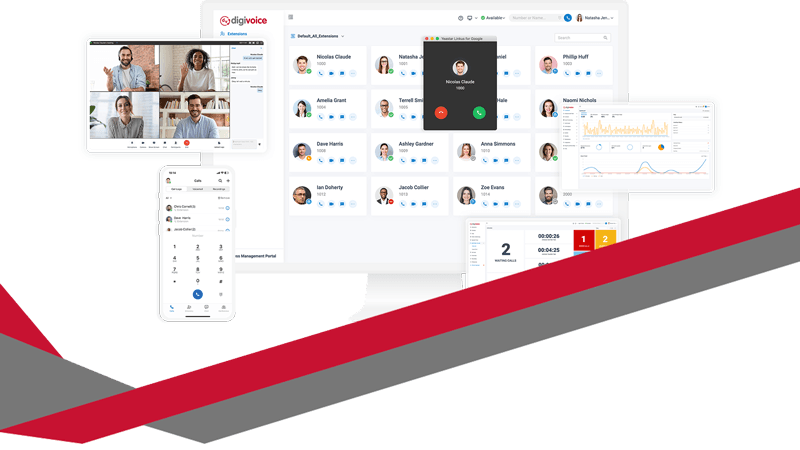
Digivoice cloud telephony sits at the centre of many conversations UK business owners already have in their heads. Calls drop at the wrong moment. Teams struggle to sound professional when working remotely. Customers complain about delays, missed calls, or confusing menus. Meanwhile, traditional phone systems feel expensive, inflexible, and outdated. This blog explores those frustrations in detail and explains how Digivoice cloud telephony addresses them in a practical, business-focused way.
Why business phone systems cause daily frustration
Most business owners do not wake up wanting a new phone system. Instead, they feel irritation building over time. Missed calls mean lost opportunities. Poor call quality damages trust. Desk phones tie staff to one place, even when work patterns change. Costs creep up quietly through line rental, call charges, and maintenance contracts.
At the same time, customer expectations rise. People expect fast answers and seamless experiences. They dislike being passed around or left on hold. When communication falters, confidence drops quickly. That pressure pushes many businesses to search for better solutions.
What people usually Google before choosing cloud telephony
Search behaviour reveals real concerns. Business owners often type phrases like “why do calls keep dropping,” “best phone system for remote teams,” or “how to manage business calls from mobiles.” These searches point to deeper needs.
Flexibility matters. Reliability matters. Control matters.
Digivoice cloud telephony speaks directly to those needs. It replaces physical phone systems with a cloud-based platform. Calls route intelligently. Features scale easily. Teams work from anywhere without losing professionalism. That shift changes how businesses communicate every day.
How cloud telephony changes the way teams work
Cloud telephony removes location barriers. Staff answer calls from desks, laptops, or mobiles using the same business number. Customers experience continuity, even when teams work remotely or across sites. As a result, businesses appear organised and responsive.
Management also becomes simpler. Administrators control users, call flows, and features through an online portal. Changes happen instantly. There is no waiting for engineers or rewiring offices. That speed supports growing businesses and evolving teams.
Common problems Digivoice cloud telephony solves
Many issues surface repeatedly during sales conversations and support queries. These problems affect productivity, customer satisfaction, and morale.
Missed calls during busy periods or staff absences
Inconsistent call handling between office and remote workers
Rising costs from traditional phone lines and maintenance
Each issue creates friction. Digivoice cloud telephony addresses them by centralising control and distributing access. Calls route to available staff. Voicemail messages arrive by email. Call queues manage peaks calmly. Costs remain predictable.
Why reliability matters more than ever
Businesses rely heavily on voice communication. Sales teams close deals over the phone. Support teams resolve problems through conversation. When systems fail, revenue and reputation suffer.
Cloud telephony platforms use resilient infrastructure. Providers host services in secure data centres with redundancy built in. That design reduces downtime compared with on-site hardware. For UK businesses, this reliability supports consistent service delivery.
The Ofcom highlights that reliable communications remain critical for business continuity, especially as flexible working becomes standard. That context explains why many organisations reassess their telephony strategy.
Cost control without sacrificing features
Traditional systems often hide costs. Line rental, call charges, and upgrades add up gradually. Budgeting becomes difficult. Cloud telephony offers clearer pricing models. Businesses usually pay per user or per feature set. Scaling up or down stays straightforward.
Savings also appear indirectly. Reduced hardware maintenance lowers IT overhead. Faster setup saves time. Improved call handling increases conversion rates. Together, these factors improve return on investment.
Supporting hybrid and remote working models
Hybrid working now feels permanent for many organisations. Teams expect flexibility. Employers expect accountability. Communication tools must support both sides.
Digivoice cloud telephony integrates with headsets, softphones, and mobile apps. Staff keep one business identity across devices. Customers never see the complexity behind the scenes. That simplicity builds trust.
Importantly, managers still gain visibility. Call reporting shows volumes, durations, and outcomes. Data informs staffing decisions and training needs. Visibility balances flexibility.
Security and compliance considerations
Security concerns often surface during research. Business owners worry about data protection and call security. Cloud telephony providers design systems with encryption and controlled access. Regular updates address emerging threats.
UK businesses must also consider regulatory expectations. Clear call records support dispute resolution. Secure systems reduce risk. Choosing reputable providers helps meet those responsibilities confidently.
How Digivoice integrates with wider business technology
Communication rarely stands alone. Businesses use CRM systems, helpdesks, and collaboration tools daily. Cloud telephony integrates smoothly with many platforms. Screen pops display caller information instantly. Call logs sync automatically.
This integration reduces manual work. Staff spend less time searching for details. Conversations feel more informed and personal. Customers notice the difference quickly.
Planning a move to cloud telephony
Transition worries often slow decisions. Business owners fear disruption. However, migration usually happens in stages. Numbers port across smoothly. Existing handsets often remain usable. Training stays minimal due to intuitive interfaces.
Clear planning reduces risk. Asset audits identify current lines and devices. Call flow mapping clarifies routing needs. Testing ensures confidence before full rollout.
Useful checklist before choosing cloud telephony
A short checklist helps decision-making remain focused:
Does the system support remote and mobile working easily?
Can call flows change quickly without engineer visits?
Are costs predictable and scalable?
Why businesses compare providers carefully
Choice matters. Not all cloud telephony services offer the same reliability or support. UK-based hosting, clear SLAs, and responsive support teams add value. Transparent documentation builds trust.
Digicomm 360 supports businesses exploring these options through its Digivoice cloud telephony services, helping organisations align communication tools with real operational needs. You can explore more about Digivoice cloud telephony directly on the Digicomm 360 service page.
External guidance and industry context
Independent guidance supports informed decisions. Ofcom provides insight into UK communications infrastructure and reliability expectations. Reviewing such guidance helps businesses understand standards and future trends. You can find relevant information through Ofcom’s official communications guidance.
Why great Leaders choose Digivoice cloud telephony
Digivoice cloud telephony responds to real frustrations felt by UK businesses. It improves reliability, flexibility, and control without unnecessary complexity. When communication works smoothly, teams perform better and customers feel valued.
Businesses that listen to their own frustrations often find clarity. Cloud telephony then becomes an enabler rather than a headache. That shift allows leaders to focus on growth, service, and strategy.
IT Equipment Finance vs Leasing: What’s Right for UK Businesses?
Modern businesses rely heavily on technology – from IT infrastructure and networking to telecoms systems, cloud telephony, and mobile devices. But when it comes to investing in new technology, many UK businesses face the same question: should we finance IT equipment, lease it, or buy outright? Let’s explore IT Equipment Finance vs Leasing.
Understanding the difference between IT equipment finance and leasing can help businesses make smarter decisions, protect cash flow, and invest in technology that supports long-term growth.
This guide explains the options clearly, without jargon, so you can decide what works best for your organisation.
Why UK Businesses Are Turning to IT & Telecoms Finance
Technology moves fast. Buying IT and telecoms equipment outright can leave businesses exposed to:
Large upfront capital costs
Reduced cash flow
Equipment becoming outdated before it’s fully depreciated
Rather than tying up working capital, businesses pay predictable monthly amounts while using the technology immediately.
What Is IT Equipment Finance?
IT equipment finance allows businesses to purchase technology using funding spread over an agreed term.
How it works:
You select the IT or telecoms equipment you need
The cost is spread over fixed monthly payments
At the end of the agreement, you typically own the equipment
Best suited for:
Core IT infrastructure
Hardware with a longer lifespan
Businesses wanting ownership at the end of the term
Benefits:
Preserves working capital
Predictable budgeting
Ownership of assets
Can align repayments with business growth
IT equipment finance is popular with businesses investing in servers, networking equipment, desktops, laptops, and telecoms hardware that will remain in use for several years.
What Is IT & Telecoms Leasing?
Leasing allows businesses to use technology without owning it outright.
How leasing works:
Equipment is leased for a fixed period
Monthly payments cover usage
At the end of the term, you may upgrade, extend, or replace the equipment
Best suited for:
Fast-moving technology
Telecoms systems and devices
Businesses that value flexibility and upgrades
Benefits:
Lower upfront costs
Access to the latest technology
Reduced risk of obsolescence
Easier upgrades as needs change
Leasing is particularly effective for telecoms systems, cloud telephony hardware, mobile devices, and rapidly evolving IT environments.
IT Equipment Finance vs Leasing: Key Differences
Aspect
Finance
Leasing
Ownership
Typically yes
No
Upfront cost
Low
Low
Monthly payments
Fixed
Fixed
Upgrade flexibility
Limited
High
Obsolescence risk
Higher
Lower
Ideal for
Long-term assets
Fast-changing tech
There is no “one size fits all” answer – the best option depends on your business goals, cash flow, and technology strategy.
Buying IT Equipment Outright: Is It Still Worth It?
Paying cash upfront may still suit some organisations, but it comes with risks:
Capital tied up in depreciating assets
Reduced flexibility
Less ability to respond to change
For many UK businesses, buying outright is now reserved for smaller purchases or non-critical equipment, while IT and telecoms finance or leasing is used for core systems.
Choosing finance or leasing is not just a financial decision – it’s a strategic one.
Key advantages include:
Improved cash flow – capital stays available for growth
Better budgeting – predictable monthly costs
Faster deployment – no delays waiting for capital approval
Future-proofing – easier access to upgrades and modern systems
This approach allows businesses to focus on performance, productivity, and people – not just upfront costs.
IT Equipment Finance vs Leasing: Which Option Is Right for Your Business?
Ask yourself:
How long will we use this technology?
How quickly will it become outdated?
Do we want ownership or flexibility?
How important is cash flow?
Many organisations use a blended approach, financing long-term IT assets while leasing telecoms or user devices.
IT Equipment Finance vs Leasing: Getting Expert Advice Makes the Difference
Understanding IT equipment finance and leasing options can feel complex, especially when different providers and agreement types are involved.
Working with an experienced IT & telecoms partner helps ensure:
The right funding model is chosen
Costs align with business needs
Technology decisions support long-term strategy
If you’re exploring IT & telecoms finance and leasing, professional advice ensures your technology investment works harder for your business.
IT Equipment Finance vs Leasing: Ready to explore your options?
If you’d like tailored guidance on IT & telecoms finance and leasing, speak to a specialist who can assess your needs and recommend the right approach.
Choosing between corded vs wireless headsets can feel confusing when you want clarity, comfort, and great call quality. Many UK businesses face the same question as they review equipment for hybrid teams, contact centres, front-of-house roles, and busy office environments. This guide helps you compare both options with simple explanations, real-world examples, and clear advice. You also gain an easy way to choose the best headset for your team without wasting money or buying the wrong setup. You can explore our full range here: https://digicomm360.com/telephone-headsets/. Although both types work well, your team’s needs should always drive the decision. Let’s walk through everything in a clear, jargon-free way.
Understanding the Difference
Corded headsets connect directly to your device with a cable. They offer reliability and great sound. Wireless headsets use Bluetooth or DECT technology, giving you movement without cables. That freedom transforms busy workflows, especially in open offices, reception desks, and hybrid spaces. Because so many teams now work across different locations, this choice has never mattered more. The right headset boosts productivity, comfort, and professionalism every day.
Corded vs Wireless Headsets: Quick Comparison Table
Feature
Corded Headsets
Wireless Headsets
Reliability
Always stable connection
Occasional interference possible
Sound Quality
Consistent, clear audio
High quality, especially with DECT
Mobility
Limited by cable
Full movement around workspace
Battery
No charging needed
Needs charging cycle
Cost
Usually cheaper
Typically more expensive
Setup
Simple plug-and-play
Needs pairing
Best For
Desks, call centres
Hybrid work, reception, managers
Pros and Cons of Corded Headsets
Corded headsets offer strong advantages. They deliver dependable sound every time, which helps when your day involves constant calls. The cable ensures a stable connection without delays or dropouts. This reliability matters for support teams, sales floors, and reception desks. Corded devices also have predictable pricing. Because they cost less than wireless options, they suit businesses buying in bulk or replacing equipment across large teams. They also need no charging. Your team can plug in and start talking straight away without worrying about battery life. Despite those benefits, some people find the cable annoying. Movement becomes limited. Cables can tangle. The desk feels cluttered. That works for structured roles but not for people who regularly move between spaces or handle physical tasks while talking.
Pros and Cons of Wireless Headsets
Wireless headsets transform flexibility at work. The freedom to stand, walk, stretch, and move feels natural. That mobility supports healthier working habits and reduces strain during long calls. Wireless devices also suit hybrid workers who switch between different spaces. Reception teams often greet visitors while still handling calls, so the ability to keep talking while moving adds value. Managers who join quick catch-ups or step into other rooms benefit from the flexibility too. The only downside is battery management. Your team needs to charge devices, although most models now offer long battery life. Wireless headsets also cost more. The investment pays off when movement matters, but a team that spends each day seated at one workstation may not need that extra freedom. Wireless technology can sometimes face interference. However, high-quality DECT headsets minimise disruption, and most modern devices work smoothly in UK office environments.
Why the Right Headset Matters for Productivity
Your headset choice shapes comfort and performance. A poor setup slows people down and reduces call quality. A great headset builds confidence on every call, especially for customer-facing roles. When you reduce discomfort or distractions, people focus better and stay more engaged. Teams using reliable equipment handle calls faster and more accurately. That reduces stress and supports better service. Choosing between corded vs wireless headsets gives you a practical way to improve everyday working life without major expense or disruption.
Recommended For: Call Centres
Call centres rely on consistency. Corded headsets support high-volume calling with stable audio. Agents enjoy clear sound, great microphone quality, and predictable performance. Because they cost less, they suit large teams. A wired solution also supports long shifts without worrying about charging cycles. Many UK call centres still prefer corded options for these reasons. They deliver solid value, great durability, and minimal fuss. You can explore corded models here: https://digicomm360.com/telephone-headsets/.
Recommended For: Hybrid Workers
Hybrid workers benefit from wireless headsets because they move between spaces and devices. A wireless option supports movement during virtual meetings and online training sessions. It also helps people maintain focus in busy environments. The freedom to shift position or walk around while talking boosts energy and reduces fatigue. This mobility supports productivity and comfort throughout the week. Wireless devices also work well when people use both laptops and smartphones.
Recommended For: Managers and Team Leaders
Managers often join quick conversations throughout the day. Wireless headsets help them move naturally between spaces, including meeting rooms, shared spaces, and breakout areas. A wireless option also lets them stand or walk during longer calls, improving clarity and focus. Because these roles often need flexibility, wireless models offer great value. Managers can stay connected wherever they are in the office.
Recommended For: Reception and Front-of-House Teams
Reception teams multitask constantly. They greet visitors, answer calls, check bookings, and handle day-to-day tasks. Wireless headsets support that movement. The ability to step away from the desk while staying connected reduces stress and helps reception staff stay organised. A wired headset works for slower environments, but reception desks usually benefit from wireless flexibility.
Recommended For: Desk-Based Roles
Desk-based staff often prefer corded headsets because they sit in one place and want simple reliability. A wired headset offers crystal-clear sound and zero battery issues. It also costs less, which helps when buying equipment for entire teams. Your IT team will appreciate the easy setup because corded models usually work straight out of the box.
Recommended For: Sales Teams
Sales teams spend hours on calls and value freedom of movement. Movement helps them think more clearly, handle objections, and stay energised. Wireless headsets support this natural flow. They remove physical restrictions and enable dynamic conversations. Many sales professionals say the ability to stand or pace boosts confidence during important calls.
Comfort Matters More Than You Think
Comfort plays a huge role in headset choice. A headset that feels awkward causes strain. That strain affects concentration. A comfortable headset helps your team perform better and stay more engaged during long shifts or meetings. Choose a model with cushioned ear pads, adjustable height, and a flexible microphone boom. A well-fitting headset reduces fatigue and prevents tension building throughout the day.
Sound Quality and Noise Reduction
Sound quality shapes the entire experience for both sides of the call. Corded headsets offer consistent clarity. Wireless models can deliver equally strong sound, especially DECT options designed for professional environments. Noise-cancelling microphones also remove background noise. That matters in open offices and shared spaces. Clear sound helps your team feel confident and reduces misunderstandings.
Battery Life and Charging Considerations
Wireless devices need charging. Encourage your team to adopt simple routines, like placing the headset on its charging base during breaks. Many modern headsets offer long battery life that supports full working days. Corded headsets remove charging concerns entirely. If your team handles long calls without breaks, a wired option may suit them better.
Durability and Longevity
Corded headsets often last longer because they contain fewer electronic components. Wireless models still offer great durability, but they sometimes face wear on the battery over time. Choosing a reputable brand reduces these issues. Digicomm360 always recommends headsets tested for business use, not consumer-grade devices.
Cost Considerations
Cost plays a major role in choosing between corded vs wireless headsets. Corded models cost less and suit large teams. Wireless options cost more but offer unmatched flexibility. Think about long-term value, comfort, and productivity when budgeting. A small investment in the right headset can save time and frustration every day.
Training and Support
Team adoption matters. A headset only helps if people use it correctly. Provide quick training sessions and simple guidance. Many staff adapt quickly because modern headsets feel intuitive. Digicomm360 supports teams through advice, setup help, and recommendations tailored to your environment.
Which Option Should You Choose?
Start with your team’s needs. If they stay at desks, choose a corded headset. If they move around, choose a wireless headset. Many companies mix both options based on role. You can explore both types here: https://digicomm360.com/telephone-headsets/. This blended approach keeps everyone comfortable and productive.
Final Thoughts
Choosing between corded vs wireless headsets gives you a smart way to improve comfort, clarity, and efficiency. Your decision affects daily working life, so take time to match headset type to job role. When you choose well, your team feels supported and confident. If you need help deciding, Digicomm360 will guide you with practical advice and real-world experience. Upgrade your team’s communication today with the right headset for every role.
In many businesses, the phone system works—until it doesn’t. Calls drop, voicemail systems go unchecked, remote teams can’t access what they need, and IT are constantly asked to fix things that should just work. For UK businesses looking to modernise, a cloud phone system might be the solution. These aren’t isolated problems. They’re signs that your communication setup is out of step with how people actually work today. For this reason, considering a cloud phone system for UK businesses could be beneficial.
digivoice Cloud Telephony is built to address these issues. But before any switch or upgrade, it helps to understand what’s going wrong—and why cloud telephony has become the go-to choice for modern UK businesses looking for efficiency. Indeed, such systems offer a significant advantage, especially as a cloud phone solution tailored for UK businesses.
Cloud Phone System for Businesses because The Office Is No Longer the Only Place Work Happens
Long before remote work became the norm, teams were already working from multiple sites, travelling between meetings, and logging in from home. Traditional phone systems never kept up. They tie communication to one physical location. When staff leave their desks, they miss calls or use personal mobiles to stay connected. Consequently, a cloud phone system for UK businesses can overcome these challenges and enhance connectivity.
Cloud telephony changes that. It runs over the internet and keeps your team connected wherever they work. That flexibility makes it the preferred choice for UK businesses—from SMEs to large, multi-site organisations.
Call Handling Affects Customer Experience More Than You Think
A missed call isn’t just a missed opportunity—it can affect your reputation. Long wait times, poor routing, or unclear voicemail messages all add up. Customers don’t always give second chances.
Businesses that want to improve customer service often look to frontline training. But the root problem is sometimes structural. If your phone system doesn’t allow intelligent routing, queueing, or reporting, your team can’t make informed changes. That’s why modern systems include features like auto attendants, call queues, and real-time dashboards—not for flash, but to improve outcomes for those looking into a cloud phone system tailored for UK businesses.
Reporting Tools Help You Learn from the Data
You need to measure performance to improve it. That applies to sales, service, operations—and especially to telephony.
Many businesses tell us, “We think calls are being handled okay, but we’re not sure.” Without clear data, you’re guessing. Call reporting tools reveal patterns. They show peak times, wait durations, and how many calls your team misses. With that insight, businesses can spot problems in their communication systems early. Moreover, adopting a cloud phone system made for UK businesses can present actionable solutions.
Cloud Phone System for businesses because IT Teams Deserve Better Than Constant Phone Fixes
Many older phone systems demand in-house technical expertise for even simple changes—like adjusting voicemail or setting out-of-hours routing. That drains time and energy from your IT team.
They should focus on driving innovation, not patching outdated tech. Cloud-based platforms remove that burden. Providers handle updates, security fixes, and configuration centrally. Admins can tweak settings through a browser in minutes—no specialist skills required. That shift gives your IT team space to support bigger goals, effectively leveraging a cloud phone system for UK businesses.
Hybrid and Field-Based Teams Need Equal Access
It’s not just office workers who need a reliable connection. Sales reps, delivery teams, engineers and support staff all rely on clear, consistent communication. But many mobile teams still use personal devices and numbers—which creates gaps in accountability and customer service.
Cloud telephony lets everyone use the same system, wherever they are. Call records are kept centrally. Voicemail can be accessed and stored digitally. And features like mobile apps and CarPlay support mean teams on the move stay in the loop—safely and professionally, all within a cloud phone system ideal for UK businesses.
Systems Should Work Together, Not in Silos
Phone systems that don’t integrate with your CRM or productivity tools waste time. Staff end up flicking between screens, manually logging calls, or trying to remember who said what.
Integrations with tools like Microsoft Teams or Salesforce mean everything happens in one place. Calls can be made directly from a CRM record. Inbound calls show who’s on the line. Conversations get logged automatically. It’s not just about convenience—it’s about accuracy, consistency, and better service. Whether for SMEs or larger enterprises, UK businesses can experience these benefits through a cloud phone system.
To learn more about how cloud-based systems like digivoice Cloud Telephony can support your wider communication strategy, you might also want to explore professional email signature tools that align with your brand voice.
And if you’re using Microsoft Teams already, you can see how it supports cloud telephony through Microsoft’s UK Teams platform.
So What Should You Look for in a Cloud Telephony System?
Choosing a provider isn’t just about ticking boxes. It’s about working with people who understand how communication affects every corner of your business.
When reviewing systems, consider:
Does it support your existing tools like Teams or your CRM?
Will remote, hybrid and field teams get the same access?
Is call data easy to access and interpret?
Changes can be made without calling support every time?
Is it compliant with UK data protection laws?
If you’re asking these questions, you’re on the right track. The goal isn’t just to fix what’s broken—it’s to build a system that supports your team, improves service, and grows with you. A cloud phone system tailored for UK businesses could be that vital tool.
digivoice Cloud Telephony is transforming the way UK businesses communicate. It brings together phone calls, messages, video, and CRM tools in one easy-to-use system. Whether your team is working from the office, at home, or across multiple sites, digivoice keeps everyone connected and in control.
What is digivoice Cloud Telephony?
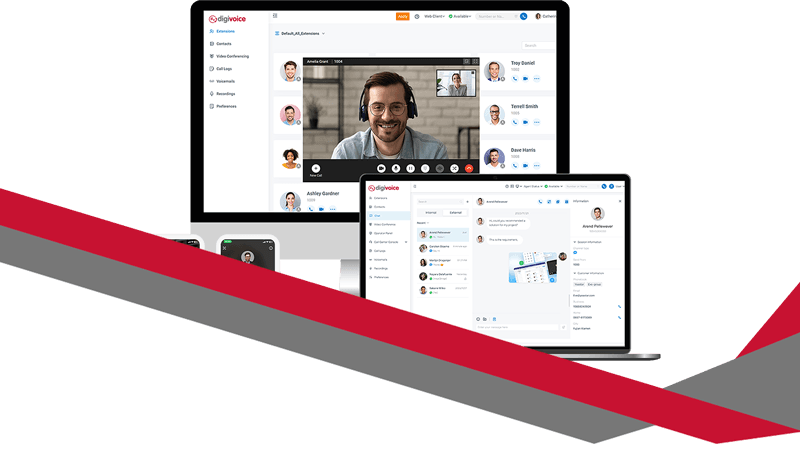
digivoice is a secure, cloud-based phone system. It doesn’t rely on traditional phone lines or bulky on-site hardware. Everything runs through the internet and is managed via a web portal or mobile app.
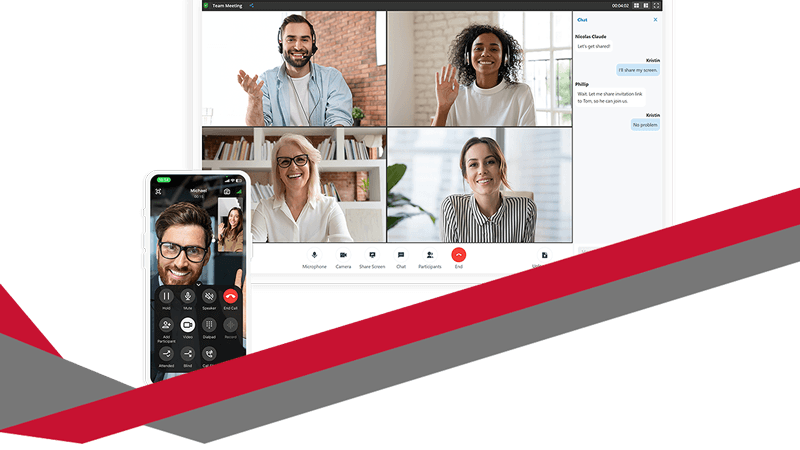
Staff can take business calls on laptops, mobiles, or desk phones—whichever suits their role best. With features like voicemail, instant messaging, call history and video calls, it’s a complete solution that keeps pace with the modern workplace.
Why UK Businesses Are Switching Now
The UK’s PSTN (Public Switched Telephone Network) will be switched off in 2027. That means traditional landline systems will become obsolete.
digivoice is already ready. No rushed upgrades. No disruption to your business. It replaces outdated tech with a scalable system built to grow with your needs—backed by UK data protection standards and full GDPR compliance.
Simple to Set Up, Easy to Use
Digicomm360’s Bolton-based support team takes care of the entire setup process. From porting your numbers to training your team, everything is handled smoothly and efficiently.
Once you’re up and running, you stay in control. Add or remove users, change call routing, or update voicemail settings—all through an intuitive admin portal. No IT knowledge needed.
Seamless CRM and Microsoft Teams Integration
If your business uses a CRM platform like Salesforce, HubSpot, or Dynamics 365, digivoice connects seamlessly. Call logs, customer records and call controls appear right inside the CRM window. This streamlines your customer service and sales processes.
For businesses already using Microsoft Teams, digivoice enhances it with full external calling. Staff can make and receive calls directly from the Teams interface—using their existing business numbers and devices.
Ideal for Remote and Field-Based Teams
digivoice works wherever your staff do. On-the-go team members can use the mobile app to stay in touch. CarPlay integration even allows hands-free calling while driving.
Whether working from home, on the road, or across multiple locations, staff get consistent access to your phone system—and customers receive a seamless experience.
Advanced Call Management Features
digivoice includes the tools your business needs to stay professional and responsive:
IVR (auto-attendant) menus
Call queues with optional callback
Voicemail to email
Call recording and live monitoring
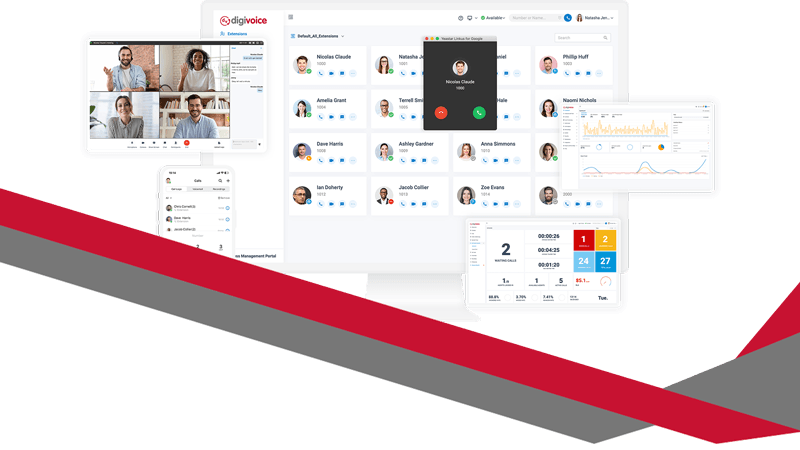
Wallboards for real-time call data
Supervisors can coach team members during live calls, monitor quality, or step in to assist. This level of control makes digivoice perfect for customer-facing teams and call centres.
Smart Analytics to Improve Performance
Every interaction tells a story. digivoice provides clear reports on call volume, missed calls, response times, and staff performance.
Managers can spot trends, reduce waiting times, and identify where more training or support is needed. These insights help businesses deliver consistently excellent customer service.
Want your business communication to look as good as it sounds? Pair digivoice Cloud Telephony with a branded email signature to present a consistent and professional image across all platforms.
Strong Security and UK Compliance
Security is central to digivoice. With TLS and SRTP encryption, two-factor authentication, and audit logging, your data stays protected.
It meets UK GDPR requirements and is aligned with Cyber Essentials Plus. This makes it a safe choice for regulated industries like healthcare, finance, and law.
Scalable and Cost-Effective
Whether you’re a five-person start-up or a multi-site organisation, digivoice grows with you. Add new users in minutes. Create new numbers or set up departments with customised call flows. Everything is flexible.
Monthly billing is clear and predictable. There are no hidden fees or maintenance costs—just one straightforward subscription.
Supported by a Local UK Team
When you need help, Digicomm360’s support team is there. Based in Bolton, they offer friendly, expert help via phone, email, or site visits.
You’re not left to figure things out yourself. From initial setup to everyday support, you get real people who understand your business and your goals.
Trusted by UK Organisations
Businesses across Greater Manchester and beyond already trust digivoice. From NHS providers and charities to estate agents and accountancy firms, it’s powering communications in every sector.
Clients regularly praise the system’s reliability, easy interface, and outstanding UK-based support.
The Future of Business Communication
digivoice Cloud Telephony isn’t just a replacement for your old phone system—it’s a step forward in how your business communicates.
You get:
Reliable call quality
Built-in CRM and Teams integration
Support for remote and mobile working
Real-time reporting and call analytics
UK-based support you can count on
With digivoice, you’re always ready to take the next call—wherever you are.
After more than two decades of connecting people across the globe, Skype will officially retire on 5th May 2025. Microsoft will say a final farewell to one of the most recognisable names in online communication. But while it may feel like the end of an era, it’s actually the start of a much more powerful way to stay connected – Microsoft Teams! Goodbye Skype, Hello Teams!
At Digicomm360, we’ve been getting lots of questions from our clients about what this means for them. So, we’ve put together this guide to walk you through the change, answer your questions, and explain why Microsoft Teams is more than just a replacement – it’s an upgrade.
So, why has Skype been shut down?
Skype has been around since 2003. For years, it was the go-to app for video calls, voice chats, and messaging. But as the world of work changed, especially after the global shift to remote and hybrid working, Microsoft needed a platform that could do much more.
That’s where Microsoft Teams comes in. It combines everything Skype could do – and adds so much more, like team collaboration, integrated calendars, secure file sharing, and full integration with Microsoft 365.
Rather than maintain two overlapping platforms, Microsoft made the decision to retire Skype and focus on making Teams the all-in-one solution for modern communication.
What does this mean if you still use Skype?
If you or your business were still relying on Skype, you’ll find that it no longer works as of 5th May 2025. Microsoft has now fully moved all its support and focus over to Teams.
But here’s the good news: Microsoft has made the switch as smooth as possible. You can log into Microsoft Teams using your existing Skype account, and your contacts and chat history will carry over with you. No need to start from scratch.
If you need help with the transition, we’re happy to support you. Digicomm360 can guide you through the setup process, help your team get up to speed, and make sure you’re getting the most out of the new platform.
Goodbye Skype, Hello Teams: Why Teams is a better option for businesses
Skype was brilliant for personal calls and small-scale communication, but let’s be honest – it had its limitations when it came to serious business use. Microsoft Teams, on the other hand, was built specifically with collaboration and productivity in mind.
Goodbye Skype, Hello Teams: Here’s what you get with Teams:
1. All-in-One Communication Chat, voice, video calls, meetings, and file sharing – all from one place. You don’t need to switch between different apps or platforms.
2. Deep Microsoft 365 Integration Teams works seamlessly with Outlook, OneDrive, Word, Excel, and the rest of the Microsoft ecosystem. That means fewer clicks, less confusion, and smoother workflows.
3. Better for Team Collaboration You can create dedicated channels for different teams, departments, or projects. Share files, assign tasks, hold video meetings, and keep conversations organised.
4. Stronger Security Teams comes with enterprise-grade security, encryption, and compliance features that are essential for today’s data protection standards.
5. Access Anywhere Whether your team is in the office, working from home, or on the road, Teams is available on desktop, mobile, and web. You’re never out of the loop.
What if you’re not using Microsoft 365?
Don’t worry – Microsoft Teams is still available as a free version. You won’t get all the advanced features, but for many small businesses, it’s more than enough to cover everyday communication and collaboration.
Of course, if you want the full experience, we can help you get set up with Microsoft 365. As an official partner, Digicomm360 can recommend the right package for your business and handle the transition without the stress.
What about other communication tools?
We get it – Microsoft Teams isn’t the only option out there. But in our experience, it’s one of the most reliable and comprehensive tools available – especially if you’re already using Microsoft 365 in some form.
Other apps might do one or two things well, but Teams is where everything comes together in one secure, centralised hub. It’s built for teamwork, and it shows.
Need help making the switch? That’s what we’re here for.
Change can be frustrating – we totally understand. But with the right support, it doesn’t have to be difficult.
If you’re unsure where to start or worried about losing data or disrupting your business, just give us a call. We can:
Help migrate your Skype contacts and chats
Set up Microsoft Teams and configure it for your business
Provide training and guidance for your team
Offer ongoing support as you get used to the new system
Goodbye Skype, Hello Teams
Skype had a fantastic run, but now it’s time to move on to something better.
Microsoft Teams gives your business everything you need to communicate, collaborate, and stay productive in one easy-to-use platform. And with Digicomm360 by your side, the transition is quick, smooth, and stress-free.