





Strong Multi-Factor Authentication Made Simple
Passwords alone are no longer enough. Cybercriminals target weak, stolen and reused passwords every day, which is why businesses are increasingly moving towards stronger Multi-Factor Authentication (MFA) solutions.
Our new AuthKey Physical Passkey Security devices provide a secure, hardware-based authentication method that helps protect your organisation against phishing attacks, credential theft and unauthorised access.
Want to learn more about why Multi-Factor Authentication is now mandatory for businesses?
Read our latest guide explaining why MFA is now mandatory for many organisations, how cybercriminals target weak passwords, and what businesses should be doing to stay protected. Read our blog: Multi-Factor Authentication (MFA) Mandatory
What is a Physical Authentication Security Key?
Physical Authentication Security Key (AuthKey) devices are physical security keys designed to add an additional layer of protection to your business accounts and systems.
Unlike traditional authenticator apps that rely on mobile devices, AuthKey provides a physical authentication method that users simply tap and enter a PIN to verify their identity securely.
These devices are designed for modern businesses looking for:

Stronger cyber security
Passwordless authentication
Protection against phishing attacks
Simpler user login experiences
Compliance-focused authentication
Secure access for hybrid and remote workers
The Three Core Principles of MFA
Multi-Factor Authentication works by combining two or more security factors to verify identity.
By combining multiple factors, businesses dramatically reduce the risk of unauthorised access and cyber attacks.
Something You Know
Passwords, PINs or passphrases.
Something You Have
A smartphone, security token or AuthKey device.
Something You Are
Biometric verification such as fingerprints or facial recognition.
Which AuthKey is Right for Your Business?
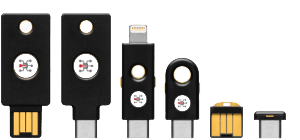
Essential AuthKey Basic
A secure and budget-friendly option for phishing-resistant logins and simple 2FA deployment.
Ideal For:
- Small businesses
- Teams needing simple MFA
- Users without authenticator apps
- Microsoft and Google account protection
Features:
- USB-A or USB-C connectivity
- FIDO2 and U2F authentication
- Tap-and-go usability
- No apps required
- Compatible with Microsoft, Google, Facebook and Dropbox
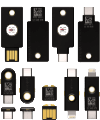
Enhanced AuthKey Pro
Our flagship business-grade security key with advanced authentication support and broad compatibility.
Ideal For:
- Businesses securing cloud apps
- Microsoft 365 environments
- VPN access
- Hybrid and remote workers
- Organisations wanting scalable login security
Features:
- USB-A, USB-C, NFC and Lightning options
- FIDO2, WebAuthn, OTP, Smart Card and OpenPGP support
- Windows, Mac, Linux, Android and iOS compatibility
- Water and crush resistant
- No batteries required
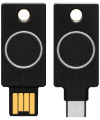
Ultimate AuthKey Bio
Advanced biometric passkey security with fingerprint verification for high-assurance authentication environments.
Ideal For:
- Compliance-heavy industries
- Businesses requiring passwordless login
- High-security user environments
- Sensitive business systems and data access
Features:
- Built-in fingerprint sensor
- Local biometric storage
- USB-A or USB-C connectivity
- FIDO2, WebAuthn and OTP authentication
- Passwordless biometric access
Why Physical Passkeys Are Replacing Authenticator Apps
Many businesses are now moving towards physical passkeys because they provide:
- Better phishing resistance
- Reduced account compromise risk
- Faster and easier logins
- Less reliance on employee mobile phones
- Improved compliance and auditing
- Stronger passwordless security
Physical passkeys are becoming a key part of modern cyber security strategies and are increasingly recommended for Microsoft 365 and cloud platform protection.
Frequently Asked Questions...
What is a physical passkey?
A physical passkey is a hardware security device that verifies a user’s identity during login using secure authentication protocols.
Do AuthKeys work with Microsoft 365?
Yes. AuthKeys are compatible with Microsoft 365 and many leading cloud platforms.
Are AuthKeys better than authenticator apps?
Physical passkeys offer stronger phishing resistance and reduce risks associated with compromised mobile devices.
Do users still need passwords?
Depending on your setup, AuthKeys can support passwordless authentication or enhanced MFA security.
Speak to Digicomm 360 About AuthKey Security
Digicomm 360 can help you deploy secure physical passkey solutions that protect your users, devices and business systems. Contact our team today to discuss AuthKey deployment, pricing and business cyber security support.
Looking to Strengthen Your Business Cyber Security?
Explore our latest cyber security guides, expert advice and practical insights to help protect your people, devices, data and systems from evolving online threats.
AI is rapidly becoming part of everyday business, but with another monthly licence to consider, many organisations are asking the same question: is...

AI Security for Businesses Has Never Been More Important AI security for businesses has quickly become one of the most important topics in...

Software vulnerabilities continue to be one of the most common causes of cyber security incidents across the UK. Following a recent cyber attack...
Multi-Factor Authentication (MFA) is now a mandatory requirement for businesses using cloud systems, and it’s one of the most important steps you...
Shadow AI is already appearing in businesses everywhere – often without anyone realising. Employees are increasingly using AI tools like...
Seasonal cyber scams and why your business must prepare Seasonal cyber scams rise every December as fraudsters take advantage of the rush, the...
In today’s connected world, digital security is no longer optional. Cybercrime has evolved fast, and small to medium-sized businesses are now major...

Strengthen Your Digital Defences – In today’s digital landscape, password protection is more critical than ever. With cyber threats evolving...
Microsoft has made passkeys the default authentication method for all new accounts. This decision marks a significant shift towards a more secure...
If you’ve read our previous blog about SonicWall, you’ll already know why cybersecurity matters. But let’s dive a little deeper into one specific...
Customer Testimonials








Send us a Quick Message
By submitting this form, you agree that Digicomm 360 Ltd may use the information provided to respond to your enquiry and discuss relevant products and services. Your information will be processed in accordance with our Privacy Policy.