by victoria | 1 Aug 2025 | Telecoms
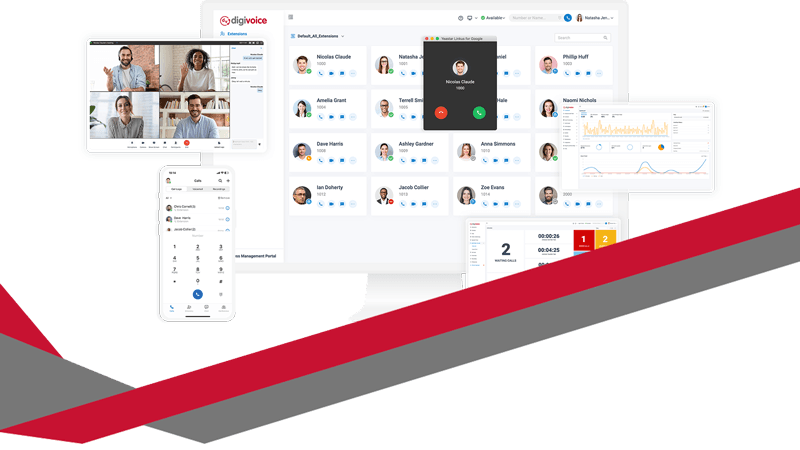
digivoice Cloud Telephony is transforming the way UK businesses communicate. It brings together phone calls, messages, video, and CRM tools in one easy-to-use system. Whether your team is working from the office, at home, or across multiple sites, digivoice keeps everyone connected and in control.
What is digivoice Cloud Telephony?
digivoice is a secure, cloud-based phone system. It doesn’t rely on traditional phone lines or bulky on-site hardware. Everything runs through the internet and is managed via a web portal or mobile app.
Staff can take business calls on laptops, mobiles, or desk phones—whichever suits their role best. With features like voicemail, instant messaging, call history and video calls, it’s a complete solution that keeps pace with the modern workplace.
Why UK Businesses Are Switching Now
The UK’s PSTN (Public Switched Telephone Network) will be switched off in 2027. That means traditional landline systems will become obsolete.
digivoice is already ready. No rushed upgrades. No disruption to your business. It replaces outdated tech with a scalable system built to grow with your needs—backed by UK data protection standards and full GDPR compliance.
Simple to Set Up, Easy to Use
Digicomm360’s Bolton-based support team takes care of the entire setup process. From porting your numbers to training your team, everything is handled smoothly and efficiently.
Once you’re up and running, you stay in control. Add or remove users, change call routing, or update voicemail settings—all through an intuitive admin portal. No IT knowledge needed.
Seamless CRM and Microsoft Teams Integration
If your business uses a CRM platform like Salesforce, HubSpot, or Dynamics 365, digivoice connects seamlessly. Call logs, customer records and call controls appear right inside the CRM window. This streamlines your customer service and sales processes.
For businesses already using Microsoft Teams, digivoice enhances it with full external calling. Staff can make and receive calls directly from the Teams interface—using their existing business numbers and devices.
Ideal for Remote and Field-Based Teams
digivoice works wherever your staff do. On-the-go team members can use the mobile app to stay in touch. CarPlay integration even allows hands-free calling while driving.
Whether working from home, on the road, or across multiple locations, staff get consistent access to your phone system—and customers receive a seamless experience.
Advanced Call Management Features
digivoice includes the tools your business needs to stay professional and responsive:
- IVR (auto-attendant) menus
- Call queues with optional callback
- Voicemail to email
- Call recording and live monitoring
- Wallboards for real-time call data
Supervisors can coach team members during live calls, monitor quality, or step in to assist. This level of control makes digivoice perfect for customer-facing teams and call centres.
Smart Analytics to Improve Performance
Every interaction tells a story. digivoice provides clear reports on call volume, missed calls, response times, and staff performance.
Managers can spot trends, reduce waiting times, and identify where more training or support is needed. These insights help businesses deliver consistently excellent customer service.
Want your business communication to look as good as it sounds? Pair digivoice Cloud Telephony with a branded email signature to present a consistent and professional image across all platforms.
Strong Security and UK Compliance
Security is central to digivoice. With TLS and SRTP encryption, two-factor authentication, and audit logging, your data stays protected.
It meets UK GDPR requirements and is aligned with Cyber Essentials Plus. This makes it a safe choice for regulated industries like healthcare, finance, and law.
Scalable and Cost-Effective
Whether you’re a five-person start-up or a multi-site organisation, digivoice grows with you. Add new users in minutes. Create new numbers or set up departments with customised call flows. Everything is flexible.
Monthly billing is clear and predictable. There are no hidden fees or maintenance costs—just one straightforward subscription.
Supported by a Local UK Team
When you need help, Digicomm360’s support team is there. Based in Bolton, they offer friendly, expert help via phone, email, or site visits.
You’re not left to figure things out yourself. From initial setup to everyday support, you get real people who understand your business and your goals.
Trusted by UK Organisations
Businesses across Greater Manchester and beyond already trust digivoice. From NHS providers and charities to estate agents and accountancy firms, it’s powering communications in every sector.
Clients regularly praise the system’s reliability, easy interface, and outstanding UK-based support.
The Future of Business Communication
digivoice Cloud Telephony isn’t just a replacement for your old phone system—it’s a step forward in how your business communicates.
You get:
- Reliable call quality
- Built-in CRM and Teams integration
- Support for remote and mobile working
- Real-time reporting and call analytics
- UK-based support you can count on
With digivoice, you’re always ready to take the next call—wherever you are.
by victoria | 1 Jul 2025 | Resources
Discover the Power of Adobe Creative Cloud – Adobe Creative Cloud is the ultimate toolkit for businesses that want to create, design, and collaborate without compromise. Whether you’re editing videos, designing logos, or producing stunning marketing content, Adobe has the tools you need. At Digicomm360, we make it simple to get the right Adobe plan, with advice and support tailored to your business.
You might think Adobe is just Photoshop. But there’s a lot more going on inside Creative Cloud. It’s a full suite of over 20 apps designed for professionals across graphic design, photography, video, web development, and more.
We’ve broken it down to show you just how powerful—and useful—this platform can be.
Everything You Need, All in One Place
When you subscribe to Adobe Creative Cloud, you get instant access to apps like:
- Photoshop – for professional photo editing and digital art
- Illustrator – perfect for logos, vector art and scalable graphics
- InDesign – ideal for brochures, flyers, and eBooks
- Premiere Pro – industry-standard video editing software
- After Effects – create amazing animations and motion graphics
There’s also Adobe Express, which is brilliant for social media posts, quick edits, and beautiful templates. You don’t need to be a pro designer to use it.
Even better, your files sync across devices using Adobe’s secure cloud storage. You can start a project on your laptop and finish it on your tablet or phone.
Built for Teamwork and Growth
Creative Cloud isn’t just about creativity. It’s about collaboration. You can share projects, get feedback in real time, and manage team access to files and fonts.
That’s why it’s ideal for growing businesses. Whether you’re a marketing agency, a video production company, or a sole trader, Adobe scales with you. You don’t have to juggle different apps from different providers.
Instead, you get everything under one umbrella, fully supported by Digicomm360.
Why Businesses Choose Adobe Creative Cloud
Here’s what makes Adobe Creative Cloud the top choice for professionals:
- Professional-grade tools – used by the world’s top creatives
- Consistent updates – stay ahead with the latest features
- Cross-platform compatibility – Mac, Windows, tablet and mobile
- Cloud-based – access files anytime, anywhere
- Enterprise licensing – flexible options for teams of all sizes
When you purchase Adobe software through Digicomm360, you also get advice tailored to your setup. We’ll help you choose the right subscription and assist with installation and support. You’re never on your own.
It’s More Affordable Than You Think
One of the myths about Creative Cloud is that it’s expensive. But when you break it down, it’s fantastic value. You’re getting over 20 high-end apps for a single monthly fee.
You don’t need to buy each piece of software separately or worry about costly upgrades. Everything is included.
There are also student, teacher, and business discounts available, and Digicomm360 can help you find the right pricing model.
Need Inspiration?
Take a look at this quick visual guide to Adobe Creative Cloud. It’s packed with ideas, examples, and app highlights. It’s a great place to see the software in action and think about how it could boost your business.
From creating slick presentations to designing your next ad campaign, the possibilities really are endless.
How Digicomm360 Can Help
We’re not just here to sell software. We’re here to support your success.
Our team works with small businesses, freelancers, and larger teams to help them make the most of Adobe Creative Cloud. We:
- Help you choose the right plan
- Support your installation and updates
- Offer advice on how to use the tools
- Make sure you’re fully licensed and compliant
Plus, we’re always at the end of the phone if you need help. We speak your language, not tech jargon.
Ready to Create?
If you’re ready to take your content creation to the next level, Adobe Creative Cloud is your answer. From a single image to a full-blown campaign, you’ll have everything you need.
Visit digicomm360.com/adobe-software to learn more or drop us a message today.
Let’s get you set up with the tools that make creativity effortless.
Digicomm Download
Creative Cloud does more than design. It transforms how your team works. At Digicomm360, we combine expert advice with seamless setup. The right tools, the right support, every step of the way.
by victoria | 22 Jun 2025 | Events, Updates
The Manchester to Blackpool Bike Ride is back this July, and one of our own is getting ready to take on the challenge. Mark from Digicomm360 is leaving his office chair behind and hopping onto his bike for a brilliant cause.
On Sunday 13th July 2025, Mark will be cycling 60 miles from the heart of Manchester all the way to the seaside finish line in Blackpool. And he’s not doing it for fun. He’s doing it to raise much-needed funds for The Christie.
The Christie is one of the UK’s leading cancer centres, offering care, support, and hope to thousands of patients and their families every year. Their work changes lives. It saves lives. And Mark wanted to give something back.
He’s training hard, braving the British weather, and clocking up the miles. From early morning rides before work to weekend long-distance practice sessions, Mark is determined to make every pedal stroke count.
And let’s not pretend it’s an easy ride. Sixty miles is no small feat. It’s a test of endurance, mindset, and resilience – not to mention the impact on his legs! But if anyone can do it, it’s Mark.
Here at Digicomm360, we’re right behind him. We’ve seen the dedication he’s putting into his training, and we know just how passionate he is about supporting The Christie. It’s not just a bike ride – it’s a mission to raise awareness and vital funds for a cause that touches so many lives.
Manchester to Blackpool Bike Ride – How You Can Help
You don’t need to jump on a bike (although we’ll cheer you on if you do). But you can be part of Mark’s journey. Whether it’s £2 or £20, every donation helps push him that little bit further. And every penny raised goes directly to The Christie.
To donate, simply head to his JustGiving page: https://www.justgiving.com/page/markpollitt
You’ll be supporting both Mark and the incredible work being done by The Christie every single day.
Why Fundraising Matters
Cancer doesn’t wait. And neither do the researchers, nurses, and care teams at The Christie. Donations like yours help fund clinical trials, world-class equipment, patient support services, and life-saving research. Your support could make a difference to someone’s tomorrow.
So when Mark rides on 13th July, he’s not just doing it for the personal challenge. He’s doing it for every family touched by cancer. For every patient in need of hope. For the future of cancer treatment.
Manchester to Blackpool Bike Ride – Follow the Journey
We’ll be cheering Mark on every step of the way – and we’ll be sharing updates before, during, and after the event. Keep an eye on our social media channels for training photos, fundraising updates, and maybe even a Lycra-clad selfie or two!
Want to get involved? Share Mark’s story with your friends, family, and colleagues. Tag us in your support posts using:
#TeamDigicomm #ManchesterToBlackpool #BikeRideForChristies #GoMarkGo #FundraisingWithHeart
Let’s build a wave of support across the North West and beyond. Together, we can help Mark smash his fundraising goal and show The Christie that Digicomm360 are behind them all the way.
Good Luck, Mark!
We couldn’t be prouder. From desk to saddle, you’ve taken on this challenge with heart and determination. Ride safe, ride strong, and know we’ll all be cheering as you cross that finish line.
Let’s do this. Let’s support The Christie. And let’s make this Manchester to Blackpool Bike Ride one to remember.
Final Push
At Digicomm360, it’s not just about business. It’s about people, purpose, and community. Supporting Mark means supporting something bigger – let’s ride together for change.
by victoria | 2 Jun 2025 | IT Support, Password Protection, Resources
Strengthen Your Digital Defences – In today’s digital landscape, password protection is more critical than ever. With cyber threats evolving rapidly, ensuring that your personal and business information is secure requires more than just a basic password. It’s time to rethink your approach to password security and adopt strategies that keep you and your data safe.
Why Password Protection Matters to Strengthen Your Digital Defences
Every day, millions of passwords are exposed in data breaches. Hackers are constantly evolving their tactics. Weak passwords are easy targets. Once compromised, a password can open the door to identity theft, financial loss, or business disruption.
To protect yourself, avoid obvious passwords like “123456” or “password.” Never use personal information such as your name, birthdate, or pet’s name. Create complex passphrases using unrelated words, numbers, and symbols. For example, “RedApple$72!BlueSky” is harder to crack.
Enable two-factor authentication (2FA) on all important accounts. This adds an extra layer of security. Even if a hacker cracks your password, they’ll need a second verification to gain access.
Update your passwords every 90 days. Avoid using the same password across multiple platforms. Use a password manager to keep track of complex passwords securely.
Following these steps can prevent identity theft, protect your finances, and secure your business from cyberattacks.
How to Create Strong Passwords
A strong password is your first line of defence against cybercriminals. Here’s how to create one:
- Length and Complexity: Use at least 12 characters, including upper and lower-case letters, numbers, and symbols.
- Avoid Personal Information: Avoid using names, birthdays, or common phrases.
- Passphrases Work: Instead of random characters, consider a passphrase – a series of unrelated words that are easy to remember but hard to guess, such as “RedChairJump23!Cloud”.
- Unique for Every Account: Never reuse passwords. Each account should have its own distinct password.
Password Managers: A Secure Solution
Keeping track of multiple strong passwords can feel overwhelming. That’s where password managers can help. They store and encrypt your passwords securely. You only need to remember one master password to access all your accounts.
Popular options include LastPass, Dashlane, 1Password, and Bitwarden. These tools generate complex passwords for you. They also autofill login details, saving you time and reducing the risk of using weak or repeated passwords.
A password manager simplifies security. It means you don’t have to remember every password. Instead, you focus on keeping your master password secure. This approach keeps your data protected without the stress of remembering multiple complex passwords.
Two-Factor Authentication (2FA): Added Security
Even the strongest password can be compromised. Two-factor authentication (2FA) adds an extra layer of security by requiring two verification methods. This typically includes:
- Something You Know: Your password.
- Something You Have: A code sent to your phone or a biometric scan.
Implementing 2FA makes it significantly harder for attackers to gain access, even if they know your password.
Password Hygiene Best Practices to Strengthen Your Digital Defences
- Change Passwords Regularly: Update your passwords at least every 90 days.
- Monitor Accounts for Suspicious Activity: Enable alerts for account access from unfamiliar devices.
- Educate Staff and Family Members: Ensure everyone understands the importance of password security and how to implement it effectively.
The Risks of Weak Passwords
Weak passwords are a gateway for cybercriminals. Commonly used passwords such as “123456,” “password,” or “qwerty” are easily cracked using automated tools. Avoid using predictable patterns and invest in robust security practices to safeguard your data.
Protect Your Business
Businesses are prime targets for cyberattacks. Implementing strict password policies, regular training, and security audits can significantly reduce risks. Encourage employees to use strong, unique passwords and enable 2FA across all business accounts.
At Digicomm 360, we provide comprehensive support to keep your digital assets secure. From implementing advanced password management systems to setting up two-factor authentication, we help you safeguard sensitive data effectively. Our experts can recommend the best password managers for your needs and guide you on creating strong, unique passwords that are hard to crack. We also offer training on password hygiene, ensuring your team understands the importance of secure practices. Protect your business from cyber threats – let us help you strengthen your defences today.
Final Thoughts to Strengthen Your Digital Defences
Password protection is more than a checkbox – it’s a fundamental aspect of digital security. By creating strong passwords, using password managers, and enabling two-factor authentication, you can significantly reduce the risk of cyberattacks. Don’t wait until it’s too late – take steps to protect your data today.
by victoria | 19 May 2025 | Resources
Why Your Business Needs a Communication Hub – Businesses now face a growing demand for swift, seamless interactions. Customers call, email, message, and chat on social media. They expect immediate, clear answers. They also want consistent experiences, no matter which channel they choose. Meanwhile, staff struggle with clunky systems that fail to sync vital data. These issues lead to delays, missed enquiries, and frustration on both sides.
However, the Communication Hub solves these challenges. It unifies telephony, CRM, social channels, and more. As a result, your team gains a single interface for every customer touchpoint. They see conversation histories, real-time call stats, and relevant account details. This improvement drives faster responses, better collaboration, and higher satisfaction.
Moreover, many businesses discover they can trim expenses by consolidating services. They no longer pay for multiple disconnected apps. Instead, they use one efficient solution. Consequently, they simplify maintenance and cut down on technical issues. They also gain a future-proof setup that adapts to new trends with minimal effort.
Why Your Business Needs a Communication Hub
Your clients value quick, helpful support. They might call on Monday, tweet on Tuesday, and email on Wednesday. Inconsistent handling across these platforms damages trust. Consequently, they might feel ignored or undervalued. A Communication Hub tracks every message in one place. It gathers calls, emails, and social interactions inside a single dashboard.
Teams no longer scramble between tabs or external databases. They focus on solving problems instead of hunting for information. In turn, this approach increases efficiency. Employees respond confidently because they see complete customer histories. They also avoid repeating the same questions, which keeps interactions smooth and professional.
Meanwhile, managers track performance through wallboards and analytics. They identify peak call times, measure average handling durations, and spot gaps that need attention. Consequently, leaders make informed decisions about staffing, training, or additional features. They also address bottlenecks before they escalate.
Key Features and Bundles for Every Need
We begin with Hosted Enhanced Core Telephony. This foundation includes voicemail-to-email, an advanced mobile app, call bundles, and auto-attendants. Staff can answer calls anywhere, record vital conversations, and forward enquiries with ease. They manage day-to-day tasks more efficiently. Customers sense professionalism from the start.
When businesses seek more functionality, we offer Enhanced bundles. For instance, Enhanced: Pure adds a CRM system, call recording, and a wallboard. Teams gain real-time insights and a consolidated client database. They can also retrieve past calls for training or conflict resolution.
If you rely on outreach campaigns, Enhanced: Campaign includes an outbound dialler. This feature dials leads automatically, boosting productivity. Likewise, Enhanced: Helpdesk provides ticket management. Support teams track open issues from first contact to resolution. They also organise tasks to ensure faster replies.
For those aiming to integrate social media, Enhanced: Social merges platforms like WhatsApp or Facebook Messenger into your CRM. Alternatively, Enhanced: Ultimate supplies every channel. Businesses that expect rapid growth or handle multiple brands often choose the Omni-channel Contact Centre. This package offers advanced analytics, multi-site connectivity, and effortless scaling.
Integration with Microsoft Teams: A Winning Combination
Many organisations already rely on Microsoft Teams for internal chat or video calls. Our Communication Hub complements Teams by adding robust external telephony and CRM features. As a result, everyone works in a cohesive environment. They jump from an internal Teams chat to an external customer call without leaving the interface.
Moreover, managers monitor calls and messages through the integrated dashboard. They keep an eye on agent availability, queue lengths, and call recordings. Meanwhile, staff members share files in Teams while discussing solutions with colleagues. This unified approach streamlines projects, especially in remote or hybrid workplaces.
Additionally, the platform adapts to new Microsoft updates automatically. You retain full control of advanced telephony features, including call routing, reporting, and voicemail-to-email. Everything blends seamlessly, so your team enjoys a minimal learning curve. Transitioning to the cloud becomes far simpler.
Smooth Implementation and Ongoing Support
Switching communication tools might sound daunting. Nevertheless, our process eliminates much of the stress. First, we assess your current setup and note any pain points. Next, we design a tailored solution with the right Enhanced bundle. We then guide you through installation, number porting, and staff training.
During rollout, you keep your existing phone numbers and essential workflows. You also integrate any chosen social or helpdesk features at a comfortable pace. Meanwhile, our experts remain on standby to address queries or make minor adjustments. Consequently, your business experiences minimal downtime.
After you launch the new system, we continue to offer support. Updates and maintenance happen behind the scenes. You benefit from improved security, cutting-edge features, and automatic enhancements. If you ever need to scale up, we adjust your bundle without forcing a complete overhaul.
Real-World Impact: Productivity and Satisfaction
Imagine a scenario where your team answers calls, messages, and social enquiries from a single screen. They greet callers by name, reference past interactions, and solve problems in half the time. They also track every detail in the CRM for future reference. In addition, they handle incoming queries on social media with equal ease.
Consequently, your customers enjoy prompt, informed assistance. They feel heard and appreciated. This positive experience boosts loyalty and brand reputation. It also transforms frustrated callers into satisfied clients who spread the word. Meanwhile, staff morale improves when they can do their jobs effectively.
From an operational standpoint, you gain invaluable data. You discover busy periods, recurring issues, and agent performance. You also identify top-performing channels. Therefore, you allocate resources more intelligently. That level of insight shapes strategic decisions and drives growth.
Cost-Efficiency and Scalability
Organisations waste time and money juggling multiple apps for calls, emails, and social channels. By unifying everything in the Communication Hub, you reduce overhead. You pay a single monthly fee rather than several. You also streamline billing and support since one provider handles all components.
Additionally, the system scales at your pace. When you hire more people, you simply add them as users. If you expand your social presence, you integrate additional channels. You never worry about reworking the entire infrastructure. As new trends emerge, we update the platform accordingly. That flexibility protects your investment in the long run.
Moreover, you cut the risk of overlapping features or conflicting configurations. Fewer headaches arise from incompatible plug-ins. Everyone learns one interface. As a result, training times shrink, and new hires become productive faster.
Conclusion: Embrace the Future of Communication
Customer needs evolve rapidly. They expect real-time solutions, consistent messaging, and approachable support. Relying on disjointed systems leaves you vulnerable to errors and missed opportunities. By investing in a Communication Hub, you unify every channel under one user-friendly platform. In turn, you amplify engagement, increase productivity, and secure a long-term advantage.
Call us today on 01204 201 201 to discuss your unique requirements. We’ll help you find the right Enhanced bundle, ensure smooth integration, and guide you through every step. Once the system is in place, you’ll notice faster response times, happier staff, and more satisfied customers. You’ll also see a clearer path to scalability and innovation.
Don’t let outdated tools hold you back. Step into a world where telephony, CRM, and multi-channel communication merge seamlessly. Simplify your workflows, delight your audience, and stay ahead of the competition. Make the move to our Communication Hub and discover how modern technology can transform your entire approach to business communication.